Nalqevia
Slate Module
Slate Module
Couldn't load pickup availability
-
Problem Statement
Many designers can create interesting AI-assisted visuals, but turning those visuals into a clean design study often requires more structure. A visual may have a pleasing mood, yet the idea behind it can remain unclear if there is no written plan. Learners may also struggle to explain why certain colors, textures, layouts, or objects belong together. Without organized notes, design choices may feel random instead of intentional. Slate Module was created for learners who want to bring more order, language, and direction into their AI-assisted creative process. -
Solution
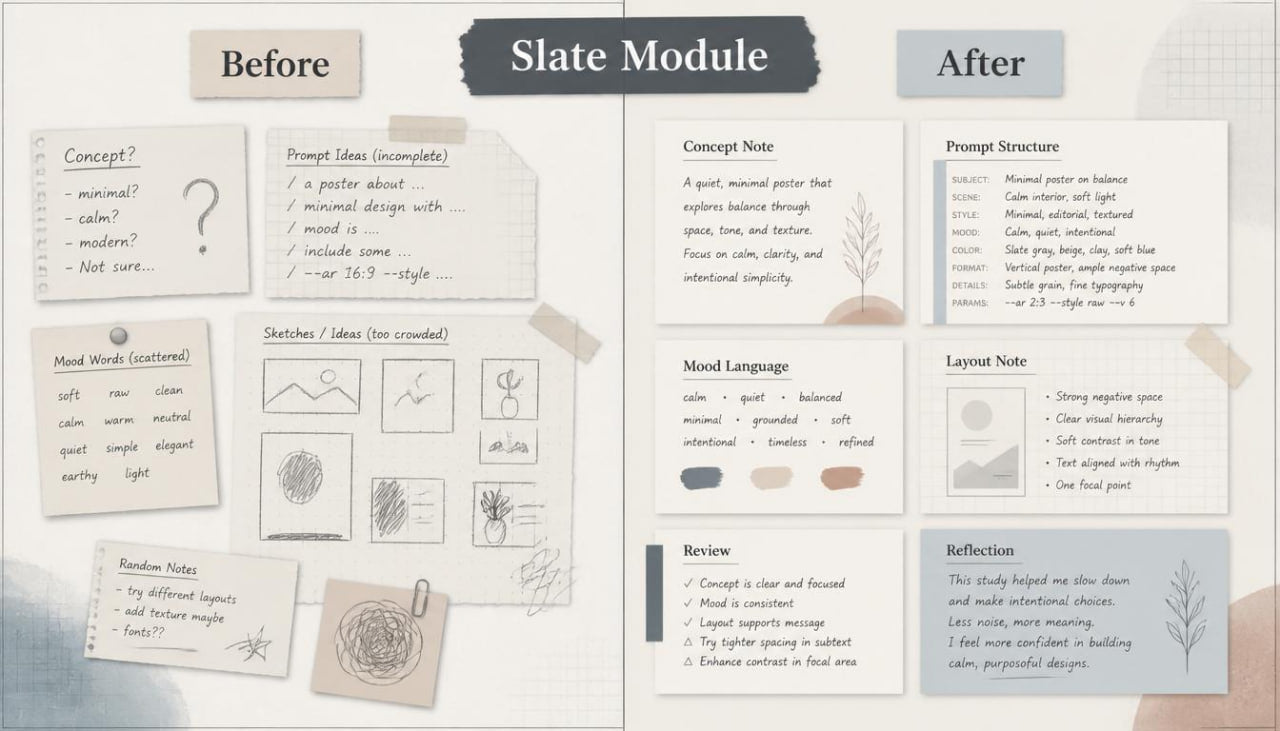
Slate Module gives learners a structured course path for writing, reviewing, and refining design ideas before and after visual exploration. The course teaches how to create concept notes, mood descriptions, layout plans, and visual review comments that support creative study. Learners work with a calm editorial-style method that connects written thinking with visual judgment. Each module helps learners describe ideas with more care and organize decisions in a readable format. The course supports a design process where AI-assisted work becomes part of a thoughtful creative routine. -
What’s Inside
Slate Module begins with a section called “The Blank Slate Method.” This opening module introduces the idea of starting with a clean concept page before moving into AI-assisted visual exploration. Learners study how to write a short design intention, define a visual theme, and describe the mood they want to explore. The goal is to replace scattered guessing with a clearer starting point.
The next module focuses on concept notes. Learners study how to write compact notes that explain the main idea behind a design direction. This may include the subject, emotional tone, color feeling, surface detail, spatial mood, and intended visual use. The course shows how these notes can guide prompt writing and later review.
A dedicated section explores editorial mood language. Learners study words and phrases connected to quiet layouts, soft contrast, clean spacing, tactile detail, muted color, layered surfaces, and refined visual rhythm. This module helps learners describe design atmosphere without relying on vague or inflated claims.
Slate Module also includes a module on visual restraint. Learners study how fewer elements can create a more focused composition. The material covers empty space, reduced object count, calmer backgrounds, softer detail, and controlled contrast. Learners practice writing prompts that avoid crowded scenes and keep attention on the main idea.
Another section focuses on structured prompt notes. Instead of writing one long prompt, learners break the idea into smaller parts: subject, setting, mood, layout, lighting, color, material, and review goal. This gives each prompt a cleaner shape and makes it easier to adjust later.
The course includes a review module called “Reading What Appears.” Learners study how to look at AI-assisted outputs through design criteria rather than personal reaction alone. They review clarity, composition, color harmony, texture behavior, visual weight, focal point, and relation to the concept note. This helps learners build a more careful review habit.
Slate Module also includes a refinement worksheet. Learners use this material to compare the first concept note with the visual result. They record what matches the plan, what feels misaligned, which details need removal, and which elements should be described with more precision in the next prompt.
A separate module covers tone consistency. Learners study how to keep mood, palette, spacing, and material feeling aligned across several visual directions. The course explains how small changes in wording can shift the result too far from the original design intention. Learners practice adjusting prompts while keeping the same quiet visual foundation.
Another part of the course focuses on layout notes for designers. Learners study how to describe wide spacing, centered objects, asymmetrical balance, open margins, layered surfaces, and calm focal areas. These notes help learners guide composition with more precision before reviewing the output.
Slate Module includes a section on design vocabulary building. Learners collect useful phrases for mood, shape, surface, light, and spatial feeling. The course encourages learners to build a personal phrase bank that reflects their own visual taste and study needs. This phrase bank can support future modules and creative exercises.
The course also includes a mini-project called “One Concept, One Page.” Learners create a compact design study around a single theme. The page includes a concept note, prompt structure, visual review, refinement notes, and a final short summary. This project helps learners connect writing, visual study, and review into one organized format.
Slate Module closes with a guided reflection section. Learners review how their wording shaped the visual direction, which details felt useful, and how their design judgment changed during the process. The reflection is written in a simple, practical way so it can support later creative study.
-
Who Is This For?
Slate Module is for designers who want a more thoughtful and organized way to approach AI-assisted creative work. It is suitable for visual creators, brand designers, editorial design learners, art direction students, and creative thinkers who enjoy calm structure and clear documentation.
This course is also useful for learners who often create visuals but struggle to explain or refine the design choices behind them. Slate Module helps them build a written layer around their creative process, making each idea easier to review, adjust, and develop. It is made for people who prefer quiet design language, structured notes, and practical creative exercises.
- What You’ll Learn
- How to begin a design study with a clean concept note
- How to describe mood, texture, spacing, color, and visual tone
- How to organize prompts into smaller, readable parts
- How to reduce clutter through more focused wording
- How to review AI-assisted visuals through design criteria
- How to compare a visual result with the original concept note
- How to refine prompts while keeping the same creative direction
- How to write layout notes for spacing, balance, and focal areas
- How to build a personal vocabulary for design study
- How to create a compact one-page creative study
- How to document design decisions in a calm and structured format
- How to connect written planning with visual review
-
30-Day Refund Note
Slate Module follows Nalqevia’s 30-day refund policy. If the course does not match the learner’s study needs, a refund request may be sent through the contact page within 30 days of purchase. The request should include order details and a short note about the reason for the request. Our team reviews each request according to the store terms and replies with the next steps.
Self-paced learning overview
- 🗂️ Digital file available after purchase
- ♾️ Long-term availability
- 🔐 Secure checkout
- 🗓️ Content updated in 2026
Do I need prior AI knowledge?
Do I need prior AI knowledge?
No prior AI knowledge is required. The materials are written with clear explanations, guided modules, and practical tasks so learners can move through the course with a calm study flow.
What do the courses include?
What do the courses include?
Each course may include modules, written materials, guided exercises, visual examples, creative prompts, and practice tasks shaped around design workflows.
Who are these courses created for?
Who are these courses created for?
They are created for designers, creative learners, brand-minded creators, visual thinkers, and anyone interested in studying how AI can support design research, concept building, and creative direction.
Share